Event payments with no ticket fees
Card, cash, check or a payment link, all on the same balance. FlockCentral takes nothing from your registrations.
Every payment on one registration
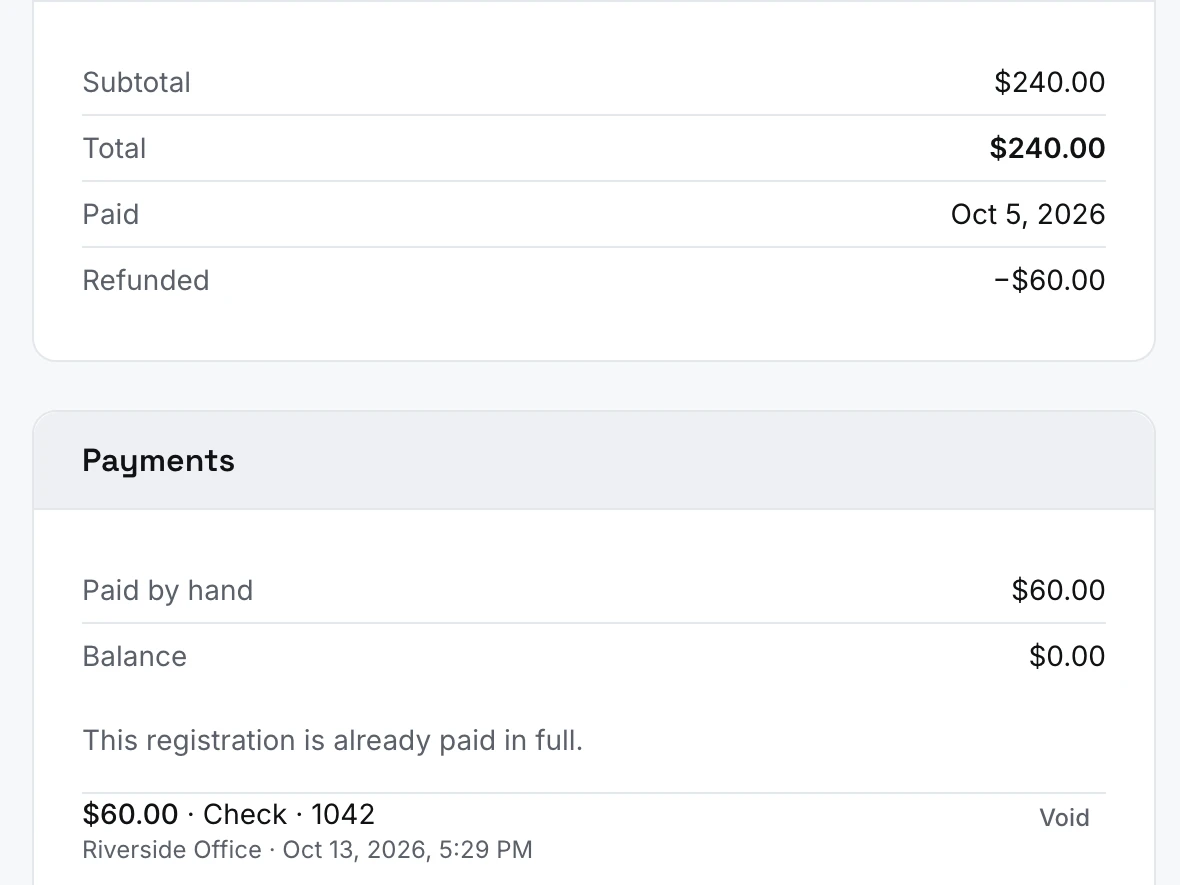
The total, what was paid by card and by hand, any refunds and the balance, on one screen. A check is recorded with its number, and a cash or check payment entered by mistake can be voided.
Card payments go straight to your organization’s own Stripe account. FlockCentral adds no fee and never holds your money.
Everything in payments
Card payments
- Card payments straight into your own Stripe account
- No FlockCentral fee on any registration
- Take a card for someone yourself
Cash and checks
- Cash, check and other payments, recorded in the same place as card payments
- The check number kept with each check
- Void a cash or check payment entered by mistake, with a reason
Balances
- Every registration shows what is owed, what is paid and what is left
- A balance paid in one go or in parts
- A confirmation email once the registration is paid
Payment links
- Payment links for all or part of a balance, expiring after 7 days or another period you choose (up to 90 days)
- Revoke a payment link at any time
Refunds
- Refunds in full or in part, with a note saying why
- Every refund stays on the registration’s record
- A list of refunds waiting to be issued
Scholarships
- Approve a scholarship request for any amount up to the cost, or decline it
Payments are included in every plan
- Free for events up to 250 people
- No fees on your tickets
- Paid adds lodging, bigger events and unlimited users
Payments FAQ
Where does the money go?
Straight to your organization’s own Stripe account, and from there to your bank. FlockCentral never holds it and takes no fee from it.
What does Stripe charge?
Stripe’s standard US rate is 2.9% + 30¢ per successful card charge (cards issued outside the US add 1.5%). That fee is set by Stripe and goes to Stripe, through your organization’s own Stripe account. FlockCentral takes nothing from your registrations, on either plan. Rates as of October 2026. See Stripe’s pricing ↗
Do I need a Stripe account?
Only for events that cost something. Free events work without it. Before you put a price on a ticket, an add-on or a bed, connect Stripe from your settings and finish Stripe’s own sign-up, which sets up an account for your organization.
How do people pay online?
By card, on Stripe’s secure checkout page, in US dollars. They pay the whole amount as they register, and their places are held for 40 minutes while they do.
Can people pay by cash or check?
Yes. Your team records cash, a check with its number, or any other payment on the registration, and the balance updates. The amount can be all or part of what is owed.
Can I take a card over the phone or at the desk?
Yes. Open the registration, choose to charge a card and type the card in. The card details go to Stripe, never to FlockCentral. If the card’s bank wants the cardholder to approve it, nothing is charged: try another card, or have them pay online.
Can someone else pay for a registration?
Yes. Create a payment link for the whole balance or part of it, copy it and send it to whoever is paying. They don’t need to log in, and the link stops working once the balance is paid, when it expires, or when you revoke it.
How do refunds work?
Open the registration, pick the card payment and refund all of it or part, with a reason. The money goes back to the card through Stripe, and Stripe keeps its original fee. Refunds you make in your Stripe dashboard show up on the registration too.
Does cancelling a registration refund it?
No, refunding is its own step, so you decide how much goes back. A cancelled registration that was paid by card and not yet refunded appears on your list of refunds waiting to be issued.
Can I see how much has been collected?
Yes. Each event shows what has been collected, after refunds, and every registration shows its total, what was paid by card and by hand, any refunds, Stripe’s fee and the balance.
When does the money reach our bank?
Stripe pays it out to your bank on your Stripe account’s schedule. Payouts are in your own Stripe dashboard.