Run the event with your whole team
See who is coming, what needs your attention and who changed what.
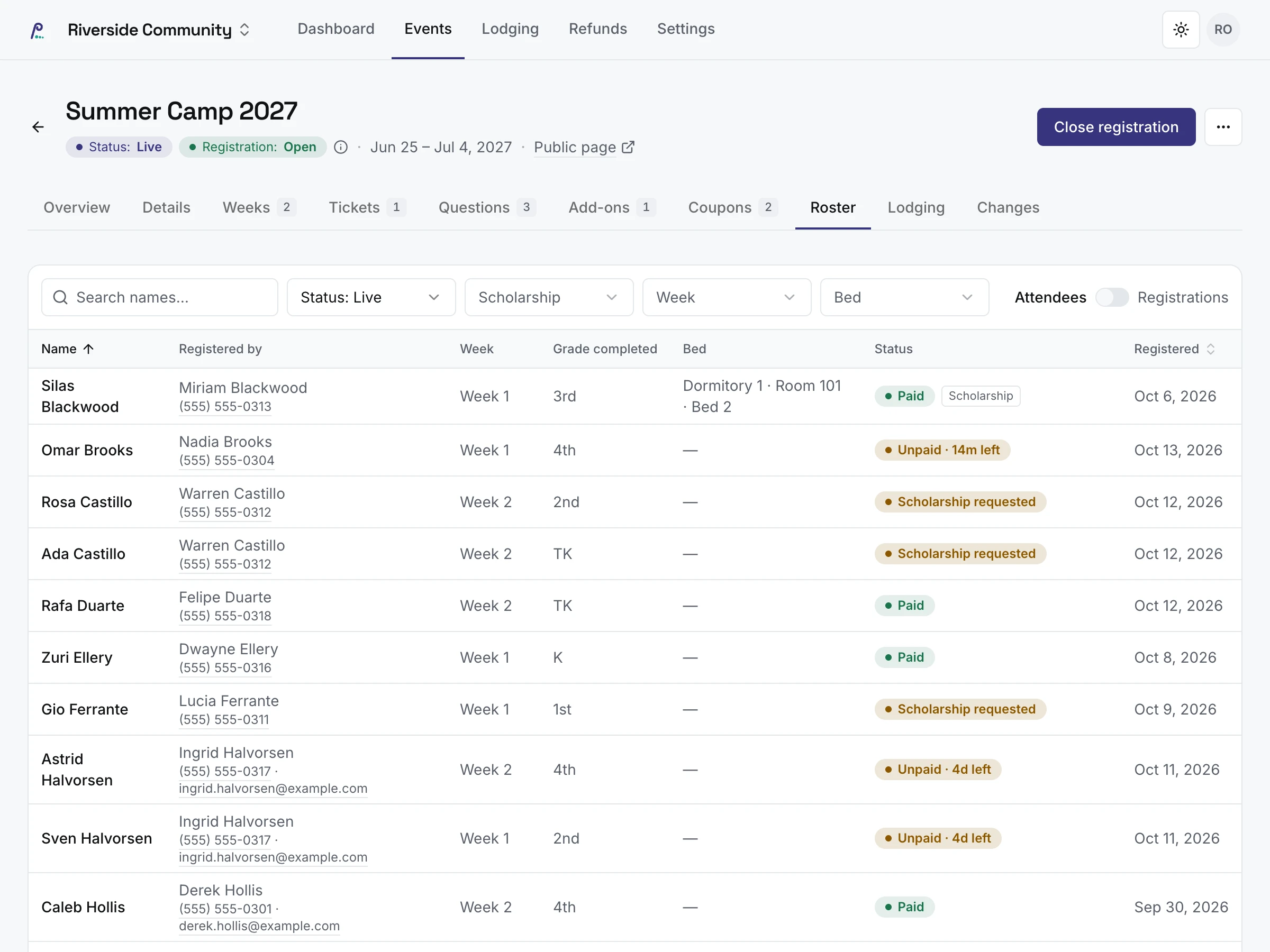
Everyone registered, in one list
Search, filter and sort everyone who registered: who registered them, their session, bed and whether they have paid. Switch between a line per attendee and a line per registration.
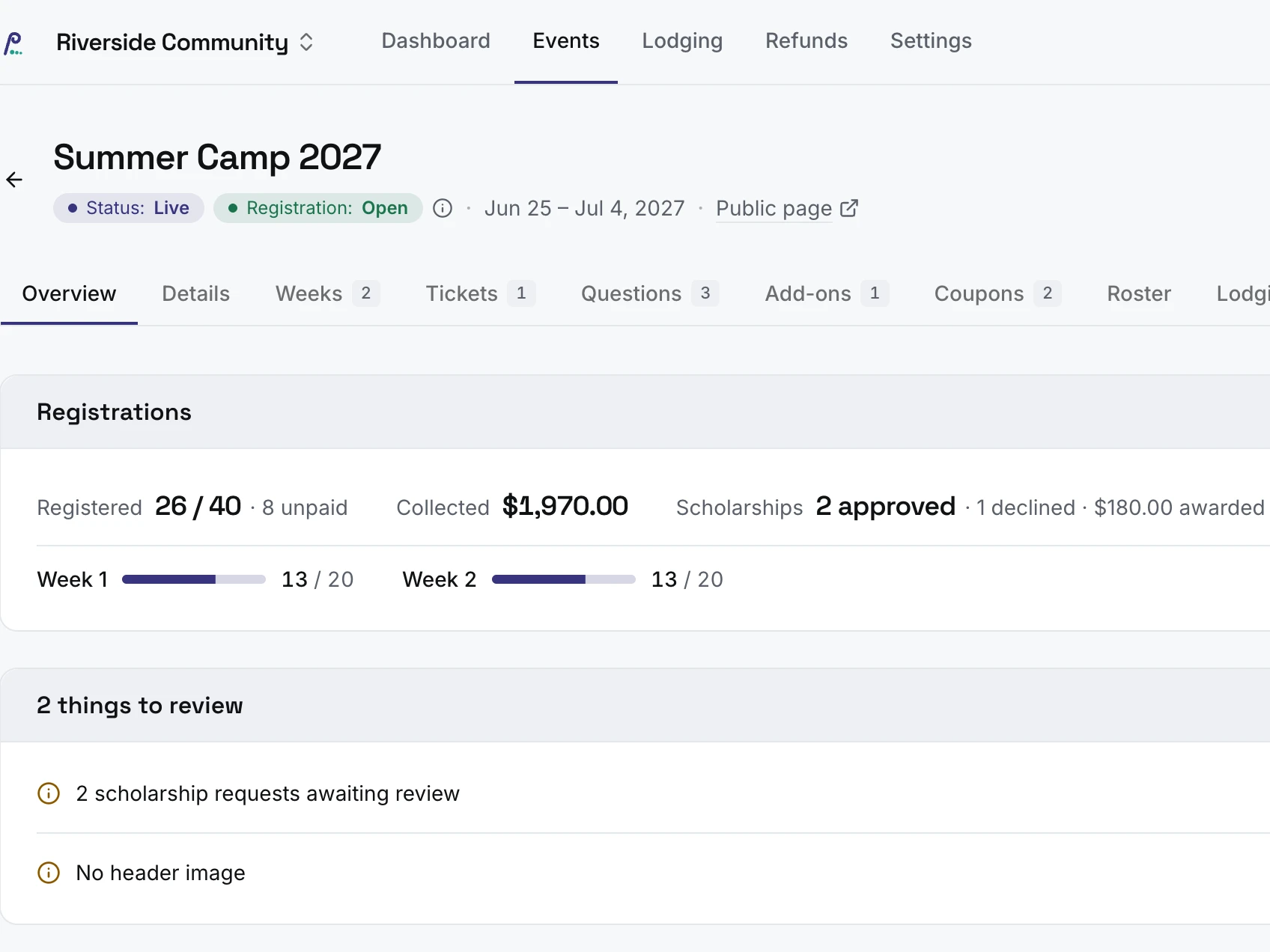
Each event at a glance
Each event has its own overview: how many have registered and how many haven’t paid, what has been collected, scholarships approved, places filled per session, and what to review.
Your dashboard does the same across every event, starting with what needs you today.
Everything in management
Dashboard and overview
- A dashboard of what needs you: scholarship requests, refunds, people without a bed, a required add-on sold out
- Every live event at a glance: registered, collected, new this week
- An overview for each event, with places filled per session
Roster and registrations
- A searchable roster, by registration or by person
- Edit a registration’s details and answers
- Private notes on a registration
- Cancel a registration, or one attendee
- Move an attendee to another session, with an email if you want
Your team, logging in securely
- Invite your team by email
- Remove someone’s access when they move on
- Log in with a password and a code sent by text
Change history
- A change history for every event, and for a registration’s details, answers, session moves, scholarship decisions and beds
Your next event
- Duplicate an event to start the next one
Management is included in every plan
- Free for events up to 250 people
- No fees on your tickets
- Paid adds lodging, bigger events and unlimited users
Management FAQ
What does the dashboard show?
What needs you today: scholarship requests to decide, refunds to issue, people without a bed, an event that can’t take payments, a required add-on that is sold out, an event still open after it ended, and drafts starting soon that are still drafts. Below that, each live event with how many have registered, what has been collected and how many are new this week.
How do I find someone in the roster?
Search by name, email or phone, then filter by session, ticket, scholarship or bed, and sort people by name or date registered, or registrations by date or total. The roster keeps your search and filters when you open a registration and come back.
What do I see when I open a registration?
Everything about it on one page: each attendee and their bed, the answers to your questions, the money, payments and refunds, any scholarship, your team’s notes and the change history.
Who can see our notes?
Only your team. People who register never see them, and each note shows who wrote it.
Can I see who changed what?
Yes. Every edit to an event, from its sessions and tickets to its questions, add-ons and coupons, is kept with who made it, when, and the old and new value. A registration keeps the same history for attendee details, answers, session moves, scholarship decisions and beds.
How many users can I add?
Up to 5 on Free, counting invitations that haven’t been accepted yet, and as many as you like on Paid. People who register for your events never count as users.
How do I add someone to my team?
Invite them by email. The link lasts 7 days; they confirm their phone with a code, choose a password and they are in. You can resend or cancel an invitation that hasn’t been used.
What can my team members do?
Everyone you invite is an admin with full access to your events, registrations and settings.
How do users log in?
With a password and a code sent to their phone by text. They can trust a browser for 30 days, so the code isn’t asked for every time; the password always is.
What happens when someone leaves our team?
Remove them and their access ends straight away. Their name stays on the changes they made, and your team list shows who removed them and when. Your organization always keeps at least one admin.
Can one person help run several organizations?
Yes. One login can belong to several organizations, and they can switch from one to another.
Can I run things from my phone?
Yes. The admin pages work on a phone or tablet as well as on a computer.
Is our data kept separate?
Yes. Each organization’s data is kept apart from every other organization’s, and it is never sold.